Lumber GO!
- 4.5
- Rating
- 100.00K
- Installs
- Free
- Price

 Analysis by App-foxy
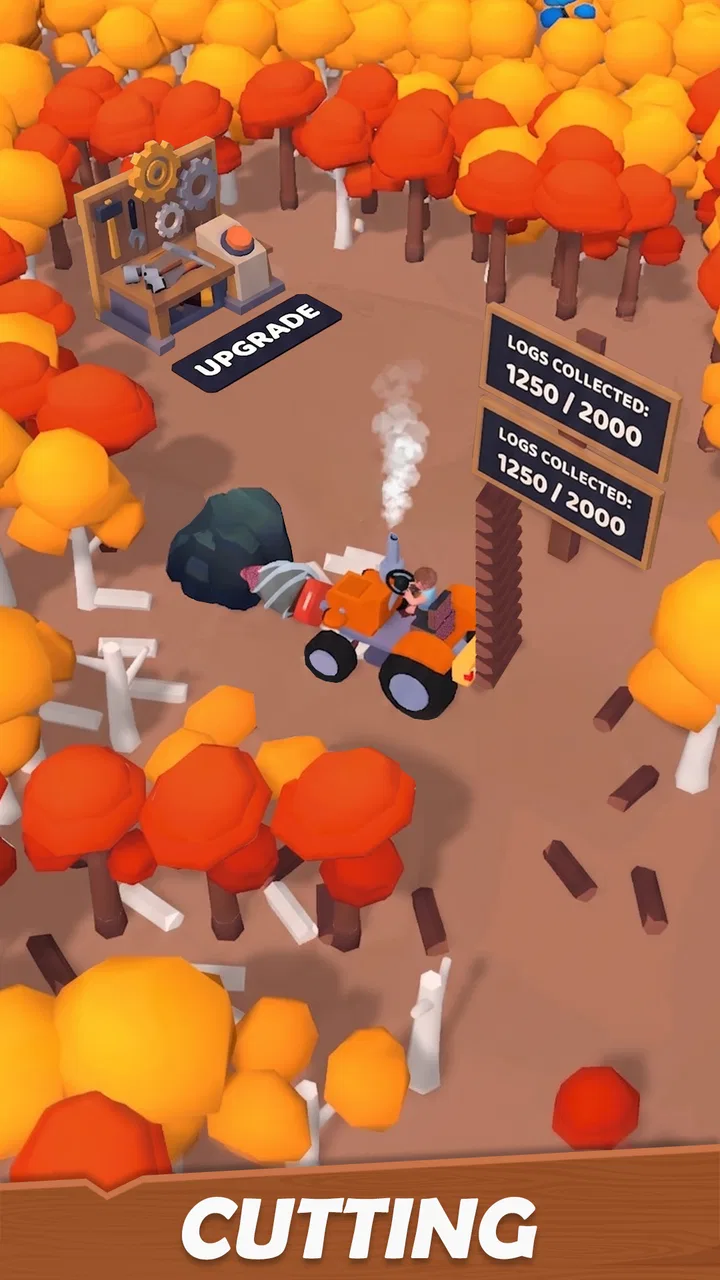
I went into Lumber GO! expecting a small arcade game built around quick decisions, and that is exactly where it works best. You take control of a lumber mech, turn cutting into sellable timber, and use the proceeds to improve your operation. The idea is easy to understand, but the appeal comes from the short loop between action, reward, and the next upgrade. It is the sort of game I can open for a few minutes without needing to remember a complicated story or a long list of objectives.
That simplicity also explains its limits. This is not a deep management simulator, a realistic forestry game, or a competitive action title. It is a lightweight arcade experience from Seikami, aimed at players who enjoy watching a basic operation become more efficient. The game is free to start, rated for Everyone, and currently sits at version 0.1.4. I would describe it as an approachable pick for casual play, provided you are comfortable with a compact gameplay concept rather than expecting a large, constantly changing world.
Getting past the first points of friction
I’d use this section to make the first session feel more deliberate: learn how one full cutting-and-selling cycle works before trying to optimize it, then notice which step most interrupts your flow. That gives you a practical way to judge whether an upgrade is helping your play style, rather than choosing one simply because it looks appealing. With the basics settled, the next question is how the game’s presentation supports that routine.
You May Also Like

 Blood Strike: 2.5 Anniversary
Blood Strike’s Loadouts Turn Every Drop Into a Tactical Gamble
A close look at Blood Strike’s custom loadouts: how fast access to signature weapons reshapes its battle royale rhythm, rewards preparation, and narrows the gap between fights.

 Pandora - Music & Podcasts
Pandora’s Music Is Easy to Start, but Harder to Recover
Pandora’s strength is its low-effort path from a seed to a station. Its weak spot is how much confidence it asks you to place in connection, setup, and quiet recovery.

 8 Ball Pool
 Is Built on Rivalries, Rematches, and Routine
A close look at the rivalries, rematches, shared routines, and unanswered safety questions that turn a quick pool match into a persistent mobile community.

 Samsung Music
’s Quiet Strength Is Playing What You Already Own
Its reach comes less from spectacle than from dependable access to a personal library. That simplicity is both the app’s strongest retention engine and its ceiling.

 AccuWeather: Weather Radar
AccuWeather Review: A Quick, Clear Forecast for Everyday Decisions
For everyday plans, the best forecast is the one you can understand quickly. AccuWeather makes rain timing, radar, and local conditions easy to act on, with a few trade-offs.

 Hill Climb Racing
Why Hill Climb Racing Still Turns Crashes Into One More Run
A tiny car, a bumpy hill and one more upgrade: Hill Climb Racing keeps resurfacing because its simple chaos makes every near-miss feel personal.
More From Our News Desk
View All News


Why the opening can feel less clear than expected
The central loop sounds obvious: chop, sell, upgrade. In practice, the first few moments are where I would expect some players to hesitate. Arcade games often teach themselves through immediate feedback, but a resource loop still requires you to understand what counts as progress. If you rush through the opening actions, you may focus on cutting while overlooking the importance of returning that work to the selling and improvement cycle.
My advice is to treat the first session as a short orientation rather than trying to optimize everything immediately. Watch what changes after each action. Notice which part of the loop gives you a direct reward and which part improves your next attempt. That small pause prevents a common mistake: spending attention on movement or tapping speed while failing to understand how the timber operation is supposed to advance.
The game is most comfortable when you accept its rhythm. You are not meant to solve a complicated industrial plan in the first minute. You are learning how the mech’s work translates into progress. Once that relationship becomes familiar, the basic actions feel more purposeful, and the game’s uncomplicated design becomes a strength instead of a weakness.
Checks worth making before blaming the game
If the game does not behave as expected, I would begin with ordinary device checks rather than assuming the lumber operation itself is broken. Confirm that the installation finished properly, close other demanding apps, and restart the game if a screen appears stuck. On older devices, freeing storage and memory can also make a noticeable difference to any game, even one with a relatively simple presentation.
Lumber GO! supports Android from version 7.1 onward, so compatibility is broad, but that does not guarantee identical performance on every phone. A device that technically meets the operating-system requirement may still be short on available memory or running many background processes. If input feels delayed, try a clean launch after closing unused apps. This is a sensible first step before repeatedly tapping or reinstalling.
I would also check whether the phone is responding normally outside the game. If other apps are slow, touch input is inconsistent across the system, or the device is overheating, the problem is probably wider than this particular arcade title. A quick restart can separate a temporary device issue from a repeatable game issue without risking progress through unnecessary changes.
A practical first-session routine
For a smoother start, I would use a simple routine. Launch the game with a stable connection if your device normally needs one for app initialization, let the opening screen settle, and then perform each core action slowly once. After that, repeat the loop at a comfortable pace instead of trying to play as quickly as possible. This makes it easier to identify whether a missed action came from the game or from an unfamiliar control.
It is also useful to keep the first upgrade decision deliberate. Rather than immediately choosing whatever appears most attractive, ask what currently slows you down. If cutting is the bottleneck, an improvement that helps the working phase may be more valuable than one that only feels rewarding. If selling is the point where your rhythm breaks, prioritize the change that gets you back into action more quickly. This is a small but meaningful trade-off in a game built around repeated cycles.
That approach gives you a baseline. You learn how long a normal loop feels, how much attention it requires, and where your own impatience creates mistakes. Later, if a session suddenly feels different, you have something useful to compare it with. Without that baseline, every awkward moment can seem like a technical fault.
Recovering when a run feels out of sync
When a game loop seems to stop responding, I prefer a staged recovery instead of immediately deleting the app. First, pause your inputs and wait briefly. Then leave the current screen in the normal way if possible, return to the game, and try one action at a time. Rapid repeated input can make it harder to tell whether the game is delayed or whether several commands were simply registered later than expected.
If that does not help, fully close the game and reopen it. A fresh launch is especially useful when the problem appeared after switching between several apps, locking the phone, or playing while the device was under heavy load. I would avoid clearing app storage as an early step, because that can affect local progress depending on how the game handles saved information. Restarting is the safer first move.
Reinstallation should be treated as a later option, not a routine fix. Before using it, make sure you understand how your progress is retained. A game that is enjoyable because of steady upgrades can become frustrating if a troubleshooting attempt removes the very progress that made the next session satisfying. When a simple restart solves the problem, there is no benefit in taking a more disruptive route.
How to make the chop, sell, upgrade loop feel better
The most useful playing habit I found was to think in cycles rather than isolated actions. Cutting is not the complete objective; it is the input for the next part of the operation. Selling is not merely a pause; it is what turns work into the ability to improve. Upgrades matter because they change the efficiency or comfort of later cycles. Keeping those three steps connected makes the game feel more coherent.
I would also avoid judging an upgrade only by its immediate visual appeal. The better choice depends on how you play. Someone who checks the game repeatedly during short breaks may value a different improvement from a player who stays for a longer session. If you tend to make mistakes when rushing, an upgrade that reduces friction can be more useful than one that promises a larger reward but demands more attention.
Another practical tip is to stop a session after a satisfying completed cycle instead of continuing until the game feels repetitive. This kind of arcade title benefits from leaving yourself a clear reason to return. Playing beyond the point where every action feels automatic can make the limited loop seem thinner than it is. Short sessions preserve the pleasant sense of progress and make the next upgrade feel like a fresh target.
When the phone, connection, or expectations are the real issue
Not every annoyance belongs to Lumber GO!. A weak battery, aggressive background restrictions, unstable connectivity, or a crowded phone can affect startup and responsiveness. If the game works normally after a restart but becomes unreliable after extended multitasking, the device environment deserves attention. Likewise, if only one location or network causes trouble, test the same action elsewhere before deciding that the app is at fault.
Expectations can create a different kind of friction. The store summary presents a timber empire, but the actual attraction is the compact arcade loop. If you are looking for detailed construction planning, extensive customization, realistic machinery, or a large campaign, you may interpret the game’s focused design as missing content. I would not install it for those reasons. Its value is in the repeated satisfaction of improving a simple operation, not in simulating every part of a logging business.
The free entry point is helpful, although in-app purchases cost $4.99 per item. That makes it worth deciding early whether you are happy to play within the free experience or whether optional spending might affect your enjoyment. I would begin without buying anything, learn how the progression feels, and only consider a purchase if the game has already proved enjoyable on its own. That keeps the decision based on actual use rather than curiosity at the start.
Who will enjoy it, and who should choose something else
I think Lumber GO! suits players who like uncomplicated arcade games with a visible progression loop. It works well for a short break, especially when you want a game that can be understood quickly and does not demand a large time commitment before becoming playable. The lumber mech gives the concept a distinct identity, while the business-like cycle gives each action a reason beyond simply scoring points.
It is also a reasonable choice for families because the age rating is Everyone, though younger players may still need help understanding the relationship between collecting, selling, and upgrading. The game’s basic premise is accessible, but accessibility does not mean every progression decision explains itself perfectly. A parent or older player can make the first session easier by showing how one complete cycle works rather than explaining every possible strategy.
I would skip it if you need a rich narrative, precise competitive balance, or a deep economy with many interacting systems. Players who prefer endless runners may find the work-and-upgrade structure slower, while fans of full management games may find it too narrow. A more elaborate simulator is the better choice when planning, staffing, production chains, and long-term complexity are the main attraction.
What the current release suggests about the experience
With a current version of 0.1.4, I approach the game as an early-stage experience rather than a finished, expansive arcade platform. That does not make it unusable; it simply affects how I judge it. The core loop needs to be enjoyable now, because the appeal should not depend on imagined future additions. At the same time, players who expect a large amount of content from the first launch may feel the focused scope quickly.
Its reception gives it a useful starting point: the game has a 4.4 average from around 1.5 thousand ratings, alongside more than 160 written reviews and over 50 thousand installs. Those figures suggest that it has attracted a real audience, but they do not replace personal fit. A player who enjoys compact progression may find the experience immediately pleasant, while someone seeking depth may reach its boundaries much sooner.
That distinction matters when deciding whether to recommend it. I would tell a friend to try it because it is free and easy to understand, not because it promises to replace every other arcade game. The right question is whether the chop-to-upgrade rhythm sounds satisfying to you. If it does, the low commitment makes testing it sensible. If the premise already sounds repetitive, no amount of popularity will change that basic reaction.
My practical verdict after using the lumber loop
Lumber GO! is a modest but approachable arcade game with a clear identity. I like that its main idea is immediately readable and that the mech gives ordinary resource gathering a playful shape. The best moments come from completing a clean cycle, seeing the operation improve, and returning to the next round with a small but understandable goal.
Its main weakness is the same quality that makes it accessible: the design is narrow. Once you understand the central loop, your enjoyment depends on how much satisfaction you get from repeating it and making incremental improvements. Troubleshooting is generally best handled with ordinary restart and device checks, while gameplay is best approached through measured cycles rather than frantic input.
My recommendation is straightforward. Try it if you want a free, light arcade game for short sessions and enjoy watching a simple timber operation become more efficient. Start slowly, learn which part of the loop holds you back, and avoid spending until you know the free experience suits you. Skip it if you need a deep simulator or a broad adventure. For the right player, Lumber GO! is an uncomplicated little break that turns chopping wood into a surprisingly pleasant routine.
FAQs for Lumber GO!
01What is Lumber GO! and what can I expect from the gameplay?
Lumber GO! is an engaging adventure game where players take on the role of a lumberjack navigating through various forest terrains. The game combines elements of strategy and action, requiring players to chop wood, avoid obstacles, and solve puzzles. With vibrant graphics and dynamic challenges, it promises hours of entertainment.
02Is Lumber GO! free to play, or does it include in-app purchases?
Lumber GO! is free to download and play, but it includes optional in-app purchases. Players can buy power-ups, skins, and other enhancements to improve their gameplay experience. While purchases can enhance the game, they are not necessary to enjoy or complete the game.
03What devices are compatible with Lumber GO!?
Lumber GO! is compatible with both Android and iOS devices. It requires Android version 5.0 and up, or iOS 10.0 or later. The game is optimized for both smartphones and tablets, ensuring a smooth gaming experience across a variety of devices.
04Does Lumber GO! require an internet connection to play?
Lumber GO! can be played offline, allowing users to enjoy the game without an active internet connection. However, certain features, like leaderboards and in-app purchases, require connectivity. Playing offline ensures uninterrupted gaming, perfect for travel or areas with limited connectivity.
05How does Lumber GO! ensure user privacy and data security?
Lumber GO! prioritizes user privacy and adheres to strict data protection standards. The app collects minimal personal information and uses secure encryption to safeguard user data. Players can access the privacy policy within the app, detailing how data is managed and protected, ensuring transparency and trust.
Pros
- Engaging gameplay with strategic elements.
- Colorful graphics enhance the gaming experience.
- Regular updates with new levels and challenges.
- Smooth performance on various devices.
- Intuitive controls suitable for all ages.
Cons
- In-app purchases can be quite frequent.
- Occasional ads disrupt the gaming flow.
- Requires internet connection to play.
- Some levels may feel repetitive over time.
- Limited customization options for characters.

Lumber GO!
Gallery